Tuesday, 2 April 2024

GIGO - Check your data


A pothole?

One of the most important lessons I learnt in computing was Garbage In = Garbage Out, the GIGO law. When I got some less than perfect results from my pothole detector I took a look at the training data.

The data had been taken from a couple of DuckDuckGo searches, being lazy I had used terms from a notebook used to find birds in trees and just changed 'bird' to 'pothole' and 'tree' to 'road surface'. I displayed the first few images of each search and they looked reasonable, but then I took a closer look.


There were quite a few images of sunspots in the search, weird. I looked at my search string, there were three variations : 'pothole', 'pothole in the sun' and 'pothole in the shade'. The last two carried over from the bird search and I had left them in, what harm could it do? In this case it seemed to do quite a lot finding 'holes in the sun'  and also quite a few pictures of awnings, sun shades maybe?


Then there were some images that had come up 'randomly' in the search, like the one above, presumably mislabelled, or maybe on a page about potholes. Of the 140 files downloaded only around 40 were usable.

The road surface query produced much better results, in as much as all the photos were of road surfaces, the issue here was that many of them were variations on a theme.


Driving off into the sunset

This image has many strong features, the white lines grass either side of the road and a skyline, that the algorithm might learn to associate with 'road surface', whereas I just want it to learn about the asphalt, or the lack of. One image like this would be fine, but I felt 25% or more was too many.

To enhance the dataset, and perhaps tailor it to the UK country roads that I cycle around, I got on my bike and took more pictures of potholes and the road surface around them. I combined these with a selection of the downloaded images to get a better training set with around 30 images in each category.

I reran the model training and got a marginally better performance on the figures and a better fit with my validation images.

Further exploration in the next post.


Wednesday, 21 February 2024

Pothole Detection, without wrecking a wheel.

Is it or isn't it?


I decided to build and train a pothole image detector as part of following along with Fast Ai's Practical Deep Learning course. The reason I chose the pothole detector was that at a previous company a similar thing had been built from scratch, completely training it ourselves. Potholes are also something I come across very regularly on the British roads I cycle around. Having come off my bicycle once in the last year I am not in a hurry to repeat the experience.


The thing that immediately struck me was how quickly the model was trained and how easy it was to do. This is mainly because what we are doing is fine tuning an existing image model rather than trying to train one up from nothing, the base model already knows a lot about images before we start. The project where we trained the pothole detector from scratch took at least five weeks to get to something reliable, whereas I have trained something that seems to work in about five minutes. It's not quite a fair comparison as there was always also a need to slice videos into images and extract metadata from them, so there was more scope in the original project.


Fast AI is designed to make the development and training of models quick and easy. It wraps a lot of the complexities of the underlying libraries, and provides utilities that allow you to download images from an internet search. There are data types that are designed to provide categories and labels, test and training data for the model you are training or tuning. I am sure that there is much more in the Fast AI library that I haven't got to yet.


The other big difference between the earlier project, which was several years ago, is that we are able to use free compute and deployment resources to evaluate and tune the model. The earlier project used the boss’s video gaming machine because that had some GPUs in it and he went through Call of Duty withdrawal whilst training was done.


The specific tools we used were Jupyter Notebooks hosted by Kaggle, a frontend generated by Gradio and hosted at Hugging Face and the code basically came from chapter 1 and 2 of the Fast AI course. The end result of that is a public demonstration that you can see here:


So how did it do? I have only tried it out on one or two images downloaded from the internet and it performs well on those, but they might well be in the training set. I have tried it on one photograph of a pothole that I took and it got that wrong, possibly because it was more of a pot crack than a pothole. I'm planning to take more photographs and carry out more of a formal evaluation of how the model is doing, and maybe tune it again on images that are more relevant to the roads that I cycle along. Fast AI seems to provide some tools and utilities to do this, so look out for another exciting instalment.

Monday, 12 February 2024

Chat vs Search

 I had to add a couple of features to the UI on the MIR infrastructure router. Not really being a UI person I could either look them up, or I could ask ChatGPT. In the end I did both, how did it pan out?

Colour Picker

The first thing I wanted to add was a colour picker. MIR now has a lot of data layers for the UK and it is helpful to be able set the colours for these, the plan was to trigger a colour picker by clicking on a randomly coloured block that the layer has as a default.

I had a few goes at this but didn't get anything satisfactory here's an example below:

system_message = "You are an expert HTML, Javascipt and CSS coder." user_message = """ Create a colour picker to change the colour of an element in a web page. """
In some ways this gave me what I asked for, HTML, CSS and JS that would, probably, change the colour of an element. Unfortunately the colour picker is an HTML form field that you have to type a CSS RGB string into rather than an actual picker.

In other attempts I managed to get a basic JS colour picker working that consisted of three sliders that would change the RGB  parameters of a colour, again setting the colour of the element when you click the button. It potentially works but isn't very interactive.

This still wasn't ideal, so I tried a Google search for a JavaScript colour picker which led me to a site with a

collection of these and out of those I chose one called Swatchy.  This is where search truly wins over chat,

because you can actually see the colour pickers in action and choose one with functionality that you like. 


Modal

The other thing I wanted to add was a help modal, things have got a bit more complicated and help where you need it seemed to be a good idea.

Again I tried ChatGPT first these are the prompts that I came up with :

system_message = "You are an expert HTML, Bootstrap 5,Javascript and CSS coder."

user_message = """
Create a box to display some help text. It should open when a button with a help icon is clicked and close when a close button is clicked.
"""
This produced what looked like workable HTML, JavaScript and CSS to create a popup box, which I guess is what one would expect, but as I am using Bootstrap I don't need.

Altering the text to ‘create a modal’ did better, in that it just produced HTML and CSS to hide and show the box. It did also make use  of the ‘data-bs-dismiss’ Bootstrap attribute to dismiss  the modal, however the CSS was unnecessary as this is already included in Bootstrap.


 A quick search for ‘bootstrap 5 modal’ took me to the Bootstrap documentation and gave me a small amount of code that I could cut and paste into my site.  2-0 to search.


TL;DR

Search isn't dead yet, especially for anything visual. Search can give you options, writing good prompts is hard.

Monday, 30 October 2023

First try at developing a website with ChatGPT

Like everyone and his brother, I have been getting interested in chatGPT and Large Language Models in

general. A lot of development for a website can be pretty repetitive from one site to another and so I wanted

to see if chat GPT could make me more productive and allow me to concentrate on the more interesting

parts of the project.


Here at Msasa a pilot project came along where we wanted  to develop a website to show a client,

even though it may never be used. This seemed like an ideal use case for trying out  chatGPT. The website

we ended up with is called  MineralMarketplace, Take a look and see what we ended up with.

In preparation I took one of DeepLearning's short courses on prompt engineering for developers. If you haven't used chatGPT, or another LLM, then I recommend this, or something like it, to get you started.

The Experimant

Firstly I created a database schema for the site, using PGAdmin in my case.  I could have tried to construct prompts to get chatGPT to do this, which I'm sure it could, but it seemed as though it would be shorter and quicker to do it myself. It also gave me structured language to pass to the LLM from which it could generate other parts of the website.  If you prefer I'm sure you could do this either by creating objects or an Open API spec and then get chatGPT to generate a database scheme from that.

The next thing to try was to throwing the schema at chatGPT, and ask it to generate the CRUD code functions in Python to populate and query it. The good news was that chatGPT understood the schema,  the bad news was that it blew out the token limit  and couldn't generate much code. To solve this I asked it to generate CRUD code for each table in turn and that worked well. Following that I then asked it to generate me a flask web server and the end points for an API that would call the CRUD code and an Open API 3 spec for that code,  again these both worked well,  although I haven't evaluated the Swagger code to check for hallucinations. 

Since I am a relatively basic front end developer and this was just a demonstration site, I decided that I

would build the front end using Flask’s Jinja templating and Bootstrap. I found that developing the Bootstrap

templates didn't work very well and in the end I gave up and downloaded a theme from an open source

Bootstrap template site. What did work was generating the forms using the LLM, although the country

dropdown again exceeded the token limit.


The token limit is, more or less, the maximum amount of text you can pass into, and get back from,

the LLM.

My final attempt using AI for the site was to try image generators to generate the background images for the various minerals,  this didn't work at all and I gave up pretty quickly and search for free images that I could use.

Would I do it again?


I would, the LLM generated a lot of boilerplate for me that just worked, and I now have a set of prompts that I

could use to do the same thing again.

The fact that it failed to create the front end wasn’t actually a huge drawback, I am not a designer so it makes a lot of sense to tweak an existing theme rather than coming up with something from scratch. The MineralMarketplace theme was originally a property website. 

Example Prompt


Given the Postgres SQL definition defined inside <sql></sql>

For Python 3 and the psycopg2 library:


step 1: For each table defined by a 'CREATE TABLE' statement in the SQL definition create an Insert

function that inserts all non serial fields in the 'CREATE TABLE' statement and returns the value of  

the serial field. Also create Read and Delete functions using the serial field name as the key.  

The function names should include the name of the table.


step 2: Using Python Flask create an api for the functions defined in step 1


step 3: Create an OpenApi v3 specification for the api defined in step 2


SQL definition: <sql>

{sql}

</sql>


Friday, 28 November 2014

5 reasons why we are happy with AngularJS

I promised a general post about our experiences on sorted.jobs with AngularJS, so here's the view from ten thousand feet, rather than the 50 foot view of other posts.

1. Good for non-designers

In some ways this is more down to Bootstrap, but combine AngularJS, Bootstrap 3 and AngularUI you have a quick and easy way to produce a responsive and dynamic website.

2. Good for non programming web designers

Angular hides most of the Javascript so it makes for easy collaboration between a front end programmer and a designer. Angularjs directives mean that some of the clever bits can be presented to the designer as new HTML tags, which he can manipulate in the same way as other tags.

3. Very clear view seperation

Views live in templates, which are just HTML files, controllers  live in javascript controller files and never the twain shall meet. The actual controller function gets specified in an attribute to a <div> or other HTML tag -what could be easier (don't mention $scope)?

4. Decent documentation and community

The AngularJS site is pretty good, with a good tutorial, developer guide, and reference. Stackexchange is very active, Egghead.io is a good source of video tutorials although there are many others.  Manning has a couple of MEAP books; I have used AngularJS in Action, which is now nearly completed, the other is  AngularJS in Depth. Packt has a whole raft of AngularJS titles, I have used Mastering Web Application Development with AngularJS, I would guess the Manning books will be more up to date than the Packt one at the moment as they aren't formally published yet.

5. Testing tool.

Angular provides Protactor for end to end testing, this uses Selenium Webdriver to run Jasmine tests via standard web browsers. It is aware of Angular directives so you can run tests on Angular loops etc. It works well and the devlopers have been helpful when I found a problem.

That'll do for now, there's loads more and AngularJS has it's quirks, but I need coffee so that's another post.

Friday, 14 November 2014

Sorting and paging with AngularJS

We have two dashboard screens that make heavy use of AngularJS on sorted.jobs, one for candidates and one for recruiters. The recruiter screen in particular can end up with an awful lot of jobs on it, so the list needs to page, in addition it would be good to be able to sort by posting date, number of applicants, company name and so on.

Recruiter Dashboard
This is where we have got up to, not too happy about the UX/UI side, but it's workable. The paging is provided by the excellent AngularUI Booststrap library. Using it is pretty simple this is the AngularJS template directive ;
        <pagination total-items="active_jobs.total" ng-model="currentActivePage" ng-change="activePageChanged()"></pagination>
Pagination needs to know the size of the array it is paging over (active_jobs.total), has a variable to store the current page in (currentActivePage) and a function to call when you change the page - activePageChanged().

And here's the controller function :
  $scope.activePageChanged = function(i) {
    $scope.activePageStart = ($scope.currentActivePage -1) * $scope.itemsPerPage;
    $scope.activePageEnd = $scope.activePageStart + 10 ;
  }
As you can see all we are doing is changing the start end end points of the items we are viewing in the array; we have been a bit lazy and not passed itemsPerPage to the directive as we are using the default of ten.

The ng-repeat call looks like this :
      <div class='row' ng-repeat="job in active_jobs.hits.slice(activePageStart,activePageEnd)">
I did see pages offering a range filter but  array.slice() seems more direct.

In this example the whole array is passed from the backend to the front in one go (this is so it can be sorted in the browser), but you don't have to do it that way, other pages we have make a call to the back  end from within the activePageChanged() function  to get the next page of results.

Sorting

AngularJS provides the orderBy filter that will sort an array, the documentation is pretty good, the only real point to pick up is that to use it in our pagination example we need to call the controller version and not use the template filter version (this would only sort the array slice and not the whole array). So in the template we make a function call :
<p><a href="" ng-click="reverse=!reverse;active_order('_source.reference', reverse)">Reference<span class="glyphicon glyphicon-resize-vertical sort-col-header"></a></p>
We call the active order function with the column we want to sort by and the direction of sort. The  reverse=!reverse just twiddles the sort order.

We then need to set up the controller to use orderBy by injecting $filter :
function SomeCtrl ($scope, $location, $filter...

and using a bit of syntactic suger :

var orderBy = $filter('orderBy');
it is just a matter of defining the function :
           
  $scope.active_order = function(col, reverse) {
    $scope.active_jobs['hits'] = orderBy($scope.active_jobs['hits'], col, reverse);
  };        

and Robert is your father's brother.
 

Thursday, 6 November 2014

Data Munging with MongoDB Aggregation and Python

I am evaluating some named entity recognition systems for sorted.jobs , trying to improve our search by sorting the wheat from the chaff, and some of the initial results look encouraging -but just how encouraging? We need to do a bit of analysis to find out.

The most hopeful results come from the extraction of programming language and operating system entities from the text -see the figure below :
Entity Types

On to MongoDB

This table was generated from a MongoDb database using two collections entities and missed_entities entities contains the terms that the program found and missed_entities the ones that I though it missed. Of the ones it found it either got it right ('Hit'), wrong ('Miss') or it was a bit dubious ('Null'). To get the stats I used the new (to me) MongoDB aggregation operations, analagous to the SQL GROUP BY, HAVING, SUM &c.

You could do all this in the old MongoDB map/reduce way, but aggregation seems a bit more intuitive.

So to get the 'Hit', 'Miss' and 'Null' columns the Python code looks like :
entity_c.aggregate([{"$group": {"_id": {"etype" : "$_type", "hit_miss" : "$hit_miss"} , "count": {"$sum": 1}}}])
which returns me rows like :
{u'count': 55, u'_id': {u'etype': u'ProgrammingLanguage'ProgrammingLanguage', u'hit_miss': u'1'}}
{u'count': 2, u'_id': {u'etype': u'ProgrammingLanguage'}}

and nothing for the misses because there weren't any.

The hard work occurs in the $group where I create a compound '_id' field made up of the entity type field and entity hit_miss field and then count all the matching entities.

The Aggregation Pipeline

But we can also look at the terms that the recogniser missed :
 
Missed entities
Here we only want the entities for the given type ('ProgrammingLanguage') and we want them in order, our PyMongo aggregate call now becomes :
missed_c.aggregate([
    {"$match" : {"_type" : etype}},
    {"$group": {"_id": "$name", "count": {"$sum": 1}}},
    {"$sort" : {"count" : -1}}
  ])
We have extra terms : '$match' which filters the documents so we only consider those with the passed in type (etype) and '$sort' which orders by the count we generated in the group. MongoDB pipelines these performing the match then the group and then the sort before returning you the result.

Finally, looking at the results we can see that there are some casing issues, we can make everything the same case by adding in a '$project' :

    { "$project" : { "name":{"$toUpper":"$name"} } },

$project creates a new field (or overwrites an existing one in the pipeline, not the real one in the collection) in this instance I have told it to make all the names uppercase and we get :
Normalised entities
It doesn't matter where in the array you place any of theses terms MongoDB will sort out the ordering.

What does this tell us? Well in this case if I could persuade the tagger to recognise CSS and variants of terms it already knows with a number on the end I would get a big jump in the overall quality of the results.

References

Angular Aggregation manual pages.

Wednesday, 5 November 2014

Retro Tech -letting out the inner anorack

Or what I did at the weekend. Time for a break from sorted.jobs, angularjs, elasticsearch and the rest, time to play with the HiFi. When I was a yoof, back in the Jurassic, we would obsess over getting the best sound from our LPs, spending ridiculous amounts of time (and money) over the biggest and most accurate soundscape. My daughter on the other hand now seems happy with playing stuff using her phone speaker, and that sounds worse than a 70s trannie, oops tranny.

Decca Kelly Ribbon Tweeters

So, back to the future, clearing out my lockup I disinterred my old Mordaunt Short 700 speakers. I bought these from a junk shop in the 80s as the tweeters were shot and I thought I could fix them. Not just any tweeters though, these were Decca Kelly Ribbon Tweeters, high end hen's teeth. Fortunately there is a nice man, called Howard Dawson who makes spares for these things, and indeed his own ribbon tweeters, a new pair of ribbons were fitted and we were off to the races.

Back then I thought they sounded excellent, there was only one drawback, they aren't small you could use them as coffins; like the man said 'there ain't no substitute for cubes'. So into the lockup they went, coming out for the odd outdoor party, and I ended up with a pair of KEF 104s good speakers, discreet (for HiFi speakers) better than any boombox going. But then the lockup had to be cleared, and we have a bigger house...
Gruesome Twosome

Time to see which ones I want to keep! The obvious thing to do was an old-style A/B test on the two of them, pick a few CDs play a track on one pair of speakers, switch over, play it on the other, see who wins. So  4 CDs  :
The idea was to get a mix of instrumental and vocal, acoustic and electronic , over a range of styles .

Who won?

The Mordaunt Shorts obviously, I wanted them to win :) To be fair I think they really did win, the bass on the KEFs are comparable to the MSs, surprising for such a small box -but then MS paired KEF units with Decca Horns in the later version.  But the treble on the 700s, driven by those tweeters, is just brilliant (although not too brilliant), you hear so much more; some fingerpicking I hadn't noticed on 'Rumour and Sigh', the girl on 'Choke' sounding like she's on fast forward, and the flute and the harp on Mozart and the acoustic instruments on Kevin's CD all sound that bit more real.

Anyone want a pair of Kef 104s? Nicer than many speakers you will find today, just not as good as something ten years older (which was probably in a much higher price bracket).

Tuesday, 28 October 2014

Early Days with Ansible for Nginx and Elastic Search on EC2

As our new recruitment site, sorted.jobs  edges towards production I have to start thinking more about the infrastructure side of things. The search part of the site uses ElasticSearch which is, by design, insecure if you can find an installation you can use it.  Current best practice seems to be to hide it behind a web server running https, normally Nginx, and use that to control access.

This gives me two sets of machines to configure, the Nginx proxy and the Elasticsearch server, since we're trying to be a grown up company we don't want to do all this by hand every time, so it make sense to script it. In the bad old days we used to do this with the Unix shell, see I said Unix not Linux -that's how old those bad old days were! Now we don't need to do that we can have centralised deployments using a variety of tools  such as Chef, Puppet and johnny-come-lately Ansible.

So why choose Ansible? I have briefly played with Chef, and looked at Puppet for another company, and I seem to remember them being fairly complicated. I did a web search to compare the two and Ansible popped up as well in several cases.

Ansible had a few things going for it ;configuration files are in standard YAML, no client to install, Jinja2 templates -which we are already using- and the words 'easy', 'simple' and 'uncomplicated' came up a lot. So I decided to give it a whirl.

Getting it going

Ansible uses a hosts file (held in /etc/ansible/hosts) to define the servers it wants to talk to. As well as defining hosts you can group them for use in playbooks.

We are running sorted.jobs ElasticSearch on EC2 so the definitions look like :
54.123.123.123 ansible_ssh_user=ansible_user ansible_ssh_private_key_file=ansible_key.pem
you can use either IP addresses or domain names to set up the server.

Running a simple command like `ansible all -m ping`or `ansible all -a "/bin/echo hello"`  will let you test out the definitions.

Once you have the definitions sorted out it is time to get Ansible to actually do something useful, you do this with playbooks. A playbook is basically just a script to tell Ansible what to do when. You run them with ansible-playbook  (e.g. ansible-playbook -v elasticsearch.yml). This caught me out initially as I was looking for an option to pass the playbook to the 'ansible' command.

First Playbook Nginx

This playbook installs Nginx uploads the certificates configuration and password files for https
---
- hosts: es_proxys
  sudo: yes

  tasks:
    - name: Installs nginx web server
      apt: pkg=nginx state=installed update_cache=true
      notify:
        - start nginx

    - name: Upload default ngix certs and conf
      copy: src=./es_proxys/conf.tar dest=/tmp

    - name: Untar
      command: tar xf conf.tar
      register: untarred
      ignore_errors: True

    - name: move to nginx etc
      command: mv conf /etc/nginx

    - name: move to nginx etc
      command: `mv .htpasswd /etc/nginx
      register: https_conf

    - name: Upload proxy vhost
      copy: src=es_proxys/es_proxy dest=/etc/nginx/sites-enabled
      when: https_conf|success
      notify:
        - restart nginx
     
     
  handlers:
    - name: start nginx
      service: name=nginx state=started

    - name: restart nginx
      action: service name=nginx state=restarted
From the top , the names of the tasks should tell you what each one is trying to do :
  1. hosts refer to the hosts -or host groups in the Ansible hosts file we talked about above.
  2. sudo -run this as root.
  3. tasks simply the list of things to do
  4. apt the ansible module for the Ubuntu packaging system
  5. notify call a handler
  6. handlers commands that can be run on demand from tasks, typically used to do things like bouncing servers.
  7. register the result of a command into a variable
  8. when conditionally run a task based on the value of a variable. In the example above  the `mv .htpasswd /etc/nginx` command must have succeeded (and, by implication, the earlier tasks) for the proxy upload to be run.

Basic ElasticSearch

This playybook installs Elasticsearch and sets it up with some extra Elasticsearch plugins and a backup configuration.

As well as the things we saw in the proxy  Playbook there are some new features :
  1. get_url  does what it says on the tin, as you can see it also checks file checksums
  2. changed_when tells Ansible when something has happened, in this case it's used because dpkg will succeed whether or not it installs anything
  3. shell runs a Linux shhell command in the raw, command samitizes it.
  4. cron sets up a cron job.
Note in one case I had to use a raw command (curl in the backup config) as I couldn't get the builtin (get_url) to work for me (horrendous quoting issues.
---
- hosts: es_servers
  sudo: yes

  tasks:
  - name: Installs java JRE
    apt: pkg=openjdk-7-jre-headless state=installed update_cache=true
    register: jre
 
  - name: Download ES
    get_url: url=https://download.elasticsearch.org/elasticsearch/elasticsearch/elasticsearch-1.3.4.deb dest=/tmp/es.deb sha256sum=6a15ab0f8c13574162e98828d7ec0e1155e6136f9d45c54b88e39222bbbd53ca
    register: es_dl
 
  - name: Install ES
    command: dpkg --skip-same-version -i /tmp/es.deb
    register: dpkg_result
    changed_when: "dpkg_result.stdout.startswith('Selecting')"
    when: jre|success and es_dl|success
    notify:
      - start es
   
  - name: Remove ES Attachment plugin
    shell: /usr/share/elasticsearch/bin/plugin -r elasticsearch-mapper-attachments || /bin/true
    register: es_plug_result
    changed_when: "'Removed' in es_plug_result.stdout"
    when: dpkg_result|success
   
  - name: Install ES Attachment plugin
    command: /usr/share/elasticsearch/bin/plugin -i  elasticsearch/elasticsearch-mapper-attachments/2.3.0
    register: es_plug_result
    changed_when: "'Installed' in es_plug_result.stdout"
    when:
    notify:
      - restart es
   
  - name: Remove ES S3 plugin
    shell: /usr/share/elasticsearch/bin/plugin -r elasticsearch/elasticsearch-cloud-aws || /bin/true
    register: es_plug_result
    changed_when: "'Removed' in es_plug_result.stdout"
    when: dpkg_result|success
   
  - name: Install ES S3 plugin
    command: /usr/share/elasticsearch/bin/plugin -i  elasticsearch/elasticsearch-cloud-aws/2.3.0
    register: es_plug_result
    changed_when: "'Installed' in es_plug_result.stdout"
    when:
    notify:
      - restart es
   
  - name: Upload s3 config
    copy: src=./s3_config.json dest=/home/ubuntu
 
  - name: Configure backup for s3
    command: curl -XPUT 'http://localhost:9200/_snapshot/s3_live' -d @/home/ubuntu/s3_config.json
    register: s3_result
    changed_when: "'acknowledged' in s3_result.stdout"
 
  - name: Remove s3 config
    command: rm /home/ubuntu/s3_config.json
 
  - name: S3 cron
    cron: name=s3_bup hour=1 minute=50 job='curl -XPUT "http://localhost:9200/_snapshot/s3_live/snapshot_$(date +\%Y\%m\%d)"'
 
   
  handlers:
  - name: start es
    service: name=elasticsearch state=started
 
  - name: restart es
    service: name=elasticsearch state=restarted

 The Book 

If you want a book there's Ansible Configuration Management I did buy this, but I think you will do just as well with the Ansible documentation.

Friday, 24 October 2014

AngularJS ng-if and ng-show

We use AngularJS to do a lot of the front end on sorted.jobs, at some point I may do some posts on the pros and cons of AngularJS, but for now it's enough to say that -in conjunction with Bootstrap it makes producing a front end pretty easy for a back end developer like me.

Anyhoo one of the joys of Angular is how easy it is to produce a display that varies depending on the data provided to it (even dynamically -although that's not the subject of this post). When we started sorted.jobs the way to do this was via ng-show and ng-hide, which basically twiddles the CSS display property for the element to show or hide it. This works very well, but the element would always be fetched from the server, it just wouldn't appear on the screen.

Now we have ng-if, this will remove the element from the DOM altogether if the expression evaluates to false, and so, assuming it is some some of resource it won't fetch it from the server, thus speeding up the page.

Quick Example

ng-show :
<img ng-show="job.user_id && !job.system.logo_url" ng-src="/logo/{{job.user_id}}/{{job_id}}" class="img-responsive">

ng-if :
<img ng-if="job.user_id && !job.system.logo_url" ng-src="/logo/{{job.user_id}}/{{job_id}}" class="img-responsive">

The ng-show in this case has a particularly bad effect in that it will load, although hide, an image that isn't there, i.e. one with no user_id!

References :

ng-if in Angular Docs
Stackexchange -you may want to read this if unexpected things start happening with ng-if, like some other Angular commands it has a habit of creating child scopes.

Thursday, 2 October 2014

AngularJS, Google Search and SEO

Our new site sorted.jobs is now in a stealthy, pre-launch mode, so it is time to start thinking about getting it into the various search engines -especially the big one.

AJAX

Our Job Posts are normally served as AngularJS views -which Google can't parse, since they are AJAX based (although interestingly it can render them with Google Fetch) . However, Google can be persuaded to fetch another version of the page and index that by including this meta tag in the head :

<meta name="fragment" content="!">

If the crawler sees this tag it will then resend the original request with ?_escaped_fragment_= tacked on the end (more here : https://prerender.io/js-seo/angularjs-seo-get-your-site-indexed-and-to-the-top-of-the-search-results/)

so
http://www.sorted.jobs/job_post/UX+Developer/ULKYpZTSSRqBGvGirp_yOQ 
would become
http://www.sorted.jobs/job_post/UX+Developer/ULKYpZTSSRqBGvGirp_yOQ?_escaped_fragment_=

on the server side in the handler I recognise the second form and render a page that is HTML only.

SEO

Since the user doesn't see this page  it doesn't need the full functionality of the original  and we also have the chance to tweak the page to do things like providing a more meaningful <title> and a <meta name=description> tag which Google can do things with as per this snippet post

 Testing and Webmaster Tools

One minor 'gotcha' that we found was with Webmaster tools, in as much as the stats aren't up to date -according to tools we have 0 pages indexed wheres a site specific google search (site:sorted.jobs) shows us  the ten pages we expect.

A second issue is that the 'Fetch' functionality within Webmaster Tools doesn't fire off the second request automatically -so you can't see the page Google would actually index from sorted.jobs on the Fetch results page, just the originally requested AngularJS page.

On the plus side if you 'Fetch' the page you can check that the <meta name="fragment" content="!"> is in the content, and if it is you can then 'Submit to Index' which will kick off Google's crawler on your page and put it into their index within minutes.

Thursday, 4 April 2013

TDD - WTF?

Test Driven Development -good or bad? A friend went for an interview recently with a leading agile consultancy, and their mantra was 'we don't want documentation -we just want TDD'. I was mulling this over and I don't agree.


'Pull the switch' -but will it work?

Documentation -all bad?

There are two problems with documentation :
  • It's always out of date.
  • No one reads it.
Too much documentation is a bad thing -I once worked on a project where we had to document everything in pseudo code at the head of each file. It was disastrous, code reviews were done on the pseudo code, rather than the real thing, it was always out of date, and you wrote the same thing twice -but differently because you ran into language features that forced you away from the pseudo code. In an extreme case I thought of a better way of doing things and implemented that rather than the pseudo code, the boss wasn't happy, but it did stay in production for at least a decade. The pseudo code also  didn't stop people doing stupid things, like implementing their own version of malloc() -which leaked like a sieve.

On the other hand I worked on another system with no documentation at all, even the output was in Dutch, a language I don't understand at all. I didn't need tests to tell me it was failing -it broke completely, pretty much everywhere; but I could have done with something telling me what it was trying to achieve, especially since there was the possibility of a big bang if it all went wrong.

On the other hand good documentation addresses the 'why' rather than the 'what' and 'how' of the code. It should tell us what a function is for or why we chose a non-obvious way to implement something, or highlight a kludge.

Oh yes, RTFM -you know it makes sense.

Testing -all good?

Well yes, generally, although not without cost, test suites have to be developed and maintained and sod's law says that the one thing that breaks there won't be a test for, but that is when you create regression tests. So unit tests, acceptance tests, regression tests you need them all.

If there is a downside it is an excessive focus on test results. Development teams can have a habit of thinking that their job is done when all the tests pass; clients tend to get annoyed if the system still isn't doing what they think it should.  They can also fix failing tests without regard to the rest of the system, 'ok test 1234 went green, but now everything is 50% slower? You think that's acceptable?'

Test Drive Development then?

I think it can work as part of a development process, but it really only addresses the 'what'; as in, 'what is this code doing right now', passing or failing? It says nothing about why the bit of code is there or even how it works and how well it works, in the language of my youth -it's  very 'bottom up', an approach that was being maligned with good reason thirty years ago.

If you fit it into a larger process -say Agile Modeling or BDD, where you have ended up with user stories, tasks and all the rest, then TDD is a valid way to go, although personally I don't think it's any better than writing code and creating unit tests afterwards. I suppose the advantage here would be that with TDD you would create the tests, otherwise you may not, as with documentation there's always something more interesting to do, but it still seems to me to encourage looking at trees rather than the whole wood.

Would I use TDD?

I have given it a go on a couple of small projects, but in the end I fell back to coding first and writing the tests second, it just seems a much more natural way of doing things. I may refactor a lot at times, and this would mean rewriting many of the tests as well. I guess I like to get a prototype working and the go back and revise towards an optimal solution, at which point I'd put in the tests. How about you?

Monday, 25 March 2013

Mobile Implementation Plan

It's almost time to start coding our  mobile  app! But we need an implementation plan.

The plan is -there is no plan. Or as we used to say diving -plan the dive, change the plan! Which is why I spent half an hour in the Port Napier sitting in a corridor waiting for the mud to settle on one occasion, and spent 30 minutes another time getting a singularly dull view of the bottom of the hull. Both times we missed the excellent dive through the middle of it.

Mucked it up twice and it's so big!


Both these times proper application of the 5 Ps would have resulted in a good dive, or even the ability to tell left from right on the second dive. That's Proper Planning Prevents Poor Performance to the uninitiated, for the initiated there's a sixth P -but this is a family blog.

Time for a plan then?

Well no, not a formal one anyway, it's easy to start planning too soon. I was working at GEC when the Nimrod AEW project collapsed, fortunately not for that bit, but £1 billion, in 1980s money! Part of the problem, I was told at the time, was the early specification of the hardware, and requirements that changed.

Anyway we're all Agile and Scrum now, we don't have plans we have backlogs, we don't have delivery dates we have sprints. So, in the spirit of Agile we'll start a product backlog and a sprint backlog although the latter will be pretty flaky as I don't know how much time I'll have to spend on this.

Or should we go Lean?

If I was in the day job, leading the team, we'd have a bunch of meetings to thrash out the product backlog with the rest of the business, playing by MoSCoW rules. Next we'd get together as a team, do the poker planning and work out what would go into the sprint. Since we're a self-managing team people would take ownership of tasks (unless I decided otherwise -that's what they pay me for.) and we'd disappear into our sprint.

But you know what? It's just me, I think we'll just have a list. Since we're at an early stage and just getting used to the technology we can start with :
  1. Get camera working from within app.
  2. Save image.
  3. Upload image (somewhere).
and that gets us to the holy grail of the Minimal Viable Product!

Friday, 8 March 2013

Mobile Scanners - The Competition

In this post we take a look at the competition. One of the drawbacks of the app stores is that there is an app for everything and sure enough it took seconds to find a couple.

CamScanner


Camscanner Screenshot


  • Scanning good, easy to use.
  • I don't like the layout of the home page.
  • Cloud integrated with their own cloud storage
  • PDF generated
  • no OCR, or if there is it's well hidden
  • Website so-so, nice and simple to the extent that it's using the back button for navigation, seems like it's a bit of a Beta.
  • App is missing confirmation here and there, e.g. pressed sync nothing happened. It did sync but I couldn't tell without looking on the web site.


Handy Scanner

Handy Scanner Screenshot

Handy scanner in play store
  • Basic scanning and sharing.
  • PDF generated
  • No organisation of documents
  • No cloud storage.
  • Simple but limited. 

Both of these apps do a decent job of capturing the image and doing some basic alignment and cleanup. With both you can easily share the document, that's the point at which HandyScanner stops. Camscanner carries on with some basic groupings, but they don't seem very helpful, you can add notes which is useful and missing from my app, but you can only tag on the website.

I think that this leaves me room for better document organisation and tagging and also for introducing OCR. That said, if you use Google Drive as storage it will attempt to OCR the document, although it failed with both my test examples.

Should I carry on, or give up and wait until Google runs our whole lives? Why is it not surprising their data centre software is called Borg, Orwell could only dream.

Mobile Design Patterns

despite my rant, I am here to design and build, (or rather build and design, since I'm a techie and not a fluffie) a mobile app so it would be good to look at some navigation patterns for it, with a view to stealing them.

We were pointed to http://www.mobiledesignpatterngallery.com as a source of inspiration and asked to pick out 3 relevant ideas.

Home Screen

How about this for a home screen?
  • This roughly matches my idea for a home screen.
  • It might be better to split search from capture in the way notification and search are split here.
  • Use of colour and icons is good, even if the colours themselves are a bit insipid.
  • The numbers against the icons could represent documents stored against a tag for me.

Tabbed Screen

Listings
I hadn't thought of this, but it's a good way of expanding the desktop beyond the screen.
  • Could be good for listing tags and the documents belonging to them
  • Limited number of tags across the top but could swipe
  • Scroll down documents
  • We already had concepts of place and time in the original design

Search Results

Filtered search

I thought this might do for the search results :
  • Icons would be tags allowing you to filter the search
  • Would anyone use it?
  • Techies love search driven sites.
  • Users only use Google.
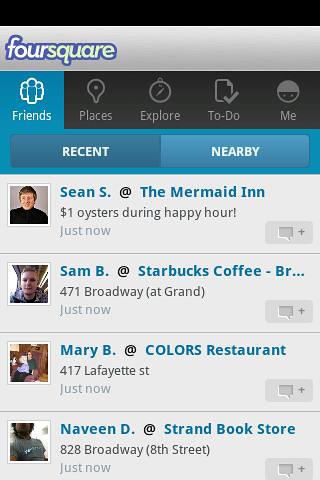
  • Is it better than the foursquare screen, which could be adapted to the same job
  • Is the overlay too big, although what's underneath isn't what the user wants to see?

 Answers on a postcard please

  • Do users use the search in a mobile app? They don't use site specific search on the web.
  • Is swiping and scrolling going to make users of the tabbed screen seasick?

Thursday, 7 March 2013

It's just an effing phone -get over it!

I was supposed to write a blog post about mobile design sites -but when I looked at them my heart just died, these mobile designers have less interesting lives than trainspotters -a black turtleneck is the new blue anorak.

It wasn't cool when I bought it
As you can see from my phone, I may not be the best person to write about mobile design, it's old, it's bust, I spent 0s arranging my desktop and the only reason the background isn't the default is that my daughter changed it. In fact the only up to date thing about it is that Evernote got hacked last week.

What do I use my phone for ( compulsory list coming up ) :
  1. Making phone calls -your phone really should do this -please take note Apple.
  2. Sending texts, the soft keyboard is actually good at this, predictive text is brain dead in this version, the one on the playbook is much better.
  3. Browsing the web -of course not, it's slow and far too small, that's what tablets are for.
  4. Email ditto desperation only.
  5. Reading a book ditto.
  6. Listening to music -could do, but don't.
  7. Checking train times -something useful, at last! You can find out when your train should have been here.
  8. Stalking (sorry social media), not since the restraining order.
  9. Navigation -was good but the GPS has never been the same since I went up Snowden with the phone in an open pocket. It was Wales, it was raining, no need for point 10.
  10. Checking the weather -well I am British (and fiercely proud of it!)
  11. Angry Birds -was amusing for 30s. now please fire the lot into an erupting volcano. I am over 12.
So I went looking at these mobile design sites :

Tech mobile blogs:
Design Inspiration:
They are Dull with a capital Duh, just lots of screen shots of mobiles with apps open in them, compare that to what the trainspotter sees :

I think that's my brother!

So my media-bespectacled brethren, throw off your turtlenecks, embrace the nutty slack and get yourselves down to the nearest sidings before it's too late. You've probably got longer than you think, see point 7 above.


Should this post have raised any issues, or upset you in any way please feel free to comment below, there are charities which can help.

Friday, 1 March 2013

Balsamiq Mockups

Following on from last week's paper exercise we now get to create some working wire frames using Balsamiq. Balsamiq is a pretty good tool for doing this and can now export pdfs with links between mockups -which gives you a prototype you can drive. The only downside is that it's expensive for just playing around with, at $12 / month, although it's cheaper if you download the tool -or use the GoogleDrive plugin.


This is a minimal working version of the app -enough to allow uploading, storage and retrieval. Although I didn't carry out the heuristic exercise -maybe at the next meeting of the Likely Lads- I did find a few obvious holes, such as the lack of a home screen. In addition when designing this I noticed some inconsistencies in the interface that I will need to go back and fix.

Following Sam's feedback on the navigation, the usual Android nav. is 'assumed' -which means I was too lazy to link up the back button and the home button, I also forgot to link up the trash.

On the choice of icons vs. a one liner list, I decided that I could get more icons on the small phone home screen. In the actual app the home screen would preferentially display a category of items that the user picks, and perhaps the actual icon could change based on a primary tag?

In the real world I'd probably do both and A/B test, or have it configurable.


Monday, 25 February 2013

Storyboarding and Prototyping the Mobile Filer

Problem Definition

In last week's need finding post I came up with the, not particularly original, idea of a mobile filer, this week it's time to prototype that. The first thing we want is a point of view, a very high level problem definition :

I want to record or copy documents and other objects and file them so that I can easily find them.


Having a definition, we flesh things out with a couple of storyboards, at this stage we are still in the 'fail early' mindset -trying to get something that looks like it will work.

Storyboarding

I created two storyboards, showing the flow through the application.

First Storyboard
First Storyboard

In the first storyboard the user organises his files on a computer, this gets around the challenge of the small screen size  and the poor interface of the phone.

Second storyboard
Second storyboard
In the second version we accept the limitations of the mobile device, on a tablet these wouldn't be so bad, and do the organising there. This means that we do the job in one go.

Ideally we would be able to use stuff we already know such as the date and time, or the location or type of image, or stuff we can work out -perhaps via OCR to carry out much of the classification automatically.

Paper Prototypes

Ideal Input System
Ideal Input System
 The ideal input system above may look a bit facetious (moi?), but it serves to illustrate a point, if this system was smart enough this is how we would like the input to work.

Likely Input System
Likely Input System
A more likely system lets the user choose between our two storyboards above, if he presses 'upload' then the image will be filed immediately, and he will probably have to sort it out later. Otherwise the user can tag the image -default tags are time stamp and location.

Finding Notes
Finding Notes

To retrieve documents the user selects a category of note and drills into it. I have just realised that I need a way to move notes between categories, so there would be an edit screen in here too.

There is also an opportunity for a simpler output system, which I had better sketch up now.

Search based interface
Search Based Interface

In this version  the user gets a set of important (flagged?, latest?) notes up front and access to the rest of the documents is driven through search.


If I get a chance I'll put up a video demonstration -but life is getting in the way.

linkedin