Thursday, 2 October 2014

AngularJS, Google Search and SEO

Our new site sorted.jobs is now in a stealthy, pre-launch mode, so it is time to start thinking about getting it into the various search engines -especially the big one.

AJAX

Our Job Posts are normally served as AngularJS views -which Google can't parse, since they are AJAX based (although interestingly it can render them with Google Fetch) . However, Google can be persuaded to fetch another version of the page and index that by including this meta tag in the head :

<meta name="fragment" content="!">

If the crawler sees this tag it will then resend the original request with ?_escaped_fragment_= tacked on the end (more here : https://prerender.io/js-seo/angularjs-seo-get-your-site-indexed-and-to-the-top-of-the-search-results/)

so
http://www.sorted.jobs/job_post/UX+Developer/ULKYpZTSSRqBGvGirp_yOQ 
would become
http://www.sorted.jobs/job_post/UX+Developer/ULKYpZTSSRqBGvGirp_yOQ?_escaped_fragment_=

on the server side in the handler I recognise the second form and render a page that is HTML only.

SEO

Since the user doesn't see this page  it doesn't need the full functionality of the original  and we also have the chance to tweak the page to do things like providing a more meaningful <title> and a <meta name=description> tag which Google can do things with as per this snippet post

 Testing and Webmaster Tools

One minor 'gotcha' that we found was with Webmaster tools, in as much as the stats aren't up to date -according to tools we have 0 pages indexed wheres a site specific google search (site:sorted.jobs) shows us  the ten pages we expect.

A second issue is that the 'Fetch' functionality within Webmaster Tools doesn't fire off the second request automatically -so you can't see the page Google would actually index from sorted.jobs on the Fetch results page, just the originally requested AngularJS page.

On the plus side if you 'Fetch' the page you can check that the <meta name="fragment" content="!"> is in the content, and if it is you can then 'Submit to Index' which will kick off Google's crawler on your page and put it into their index within minutes.

Thursday, 4 April 2013

TDD - WTF?

Test Driven Development -good or bad? A friend went for an interview recently with a leading agile consultancy, and their mantra was 'we don't want documentation -we just want TDD'. I was mulling this over and I don't agree.


'Pull the switch' -but will it work?

Documentation -all bad?

There are two problems with documentation :
  • It's always out of date.
  • No one reads it.
Too much documentation is a bad thing -I once worked on a project where we had to document everything in pseudo code at the head of each file. It was disastrous, code reviews were done on the pseudo code, rather than the real thing, it was always out of date, and you wrote the same thing twice -but differently because you ran into language features that forced you away from the pseudo code. In an extreme case I thought of a better way of doing things and implemented that rather than the pseudo code, the boss wasn't happy, but it did stay in production for at least a decade. The pseudo code also  didn't stop people doing stupid things, like implementing their own version of malloc() -which leaked like a sieve.

On the other hand I worked on another system with no documentation at all, even the output was in Dutch, a language I don't understand at all. I didn't need tests to tell me it was failing -it broke completely, pretty much everywhere; but I could have done with something telling me what it was trying to achieve, especially since there was the possibility of a big bang if it all went wrong.

On the other hand good documentation addresses the 'why' rather than the 'what' and 'how' of the code. It should tell us what a function is for or why we chose a non-obvious way to implement something, or highlight a kludge.

Oh yes, RTFM -you know it makes sense.

Testing -all good?

Well yes, generally, although not without cost, test suites have to be developed and maintained and sod's law says that the one thing that breaks there won't be a test for, but that is when you create regression tests. So unit tests, acceptance tests, regression tests you need them all.

If there is a downside it is an excessive focus on test results. Development teams can have a habit of thinking that their job is done when all the tests pass; clients tend to get annoyed if the system still isn't doing what they think it should.  They can also fix failing tests without regard to the rest of the system, 'ok test 1234 went green, but now everything is 50% slower? You think that's acceptable?'

Test Drive Development then?

I think it can work as part of a development process, but it really only addresses the 'what'; as in, 'what is this code doing right now', passing or failing? It says nothing about why the bit of code is there or even how it works and how well it works, in the language of my youth -it's  very 'bottom up', an approach that was being maligned with good reason thirty years ago.

If you fit it into a larger process -say Agile Modeling or BDD, where you have ended up with user stories, tasks and all the rest, then TDD is a valid way to go, although personally I don't think it's any better than writing code and creating unit tests afterwards. I suppose the advantage here would be that with TDD you would create the tests, otherwise you may not, as with documentation there's always something more interesting to do, but it still seems to me to encourage looking at trees rather than the whole wood.

Would I use TDD?

I have given it a go on a couple of small projects, but in the end I fell back to coding first and writing the tests second, it just seems a much more natural way of doing things. I may refactor a lot at times, and this would mean rewriting many of the tests as well. I guess I like to get a prototype working and the go back and revise towards an optimal solution, at which point I'd put in the tests. How about you?

Monday, 25 March 2013

Mobile Implementation Plan

It's almost time to start coding our  mobile  app! But we need an implementation plan.

The plan is -there is no plan. Or as we used to say diving -plan the dive, change the plan! Which is why I spent half an hour in the Port Napier sitting in a corridor waiting for the mud to settle on one occasion, and spent 30 minutes another time getting a singularly dull view of the bottom of the hull. Both times we missed the excellent dive through the middle of it.

Mucked it up twice and it's so big!


Both these times proper application of the 5 Ps would have resulted in a good dive, or even the ability to tell left from right on the second dive. That's Proper Planning Prevents Poor Performance to the uninitiated, for the initiated there's a sixth P -but this is a family blog.

Time for a plan then?

Well no, not a formal one anyway, it's easy to start planning too soon. I was working at GEC when the Nimrod AEW project collapsed, fortunately not for that bit, but £1 billion, in 1980s money! Part of the problem, I was told at the time, was the early specification of the hardware, and requirements that changed.

Anyway we're all Agile and Scrum now, we don't have plans we have backlogs, we don't have delivery dates we have sprints. So, in the spirit of Agile we'll start a product backlog and a sprint backlog although the latter will be pretty flaky as I don't know how much time I'll have to spend on this.

Or should we go Lean?

If I was in the day job, leading the team, we'd have a bunch of meetings to thrash out the product backlog with the rest of the business, playing by MoSCoW rules. Next we'd get together as a team, do the poker planning and work out what would go into the sprint. Since we're a self-managing team people would take ownership of tasks (unless I decided otherwise -that's what they pay me for.) and we'd disappear into our sprint.

But you know what? It's just me, I think we'll just have a list. Since we're at an early stage and just getting used to the technology we can start with :
  1. Get camera working from within app.
  2. Save image.
  3. Upload image (somewhere).
and that gets us to the holy grail of the Minimal Viable Product!

Friday, 8 March 2013

Mobile Scanners - The Competition

In this post we take a look at the competition. One of the drawbacks of the app stores is that there is an app for everything and sure enough it took seconds to find a couple.

CamScanner


Camscanner Screenshot


  • Scanning good, easy to use.
  • I don't like the layout of the home page.
  • Cloud integrated with their own cloud storage
  • PDF generated
  • no OCR, or if there is it's well hidden
  • Website so-so, nice and simple to the extent that it's using the back button for navigation, seems like it's a bit of a Beta.
  • App is missing confirmation here and there, e.g. pressed sync nothing happened. It did sync but I couldn't tell without looking on the web site.


Handy Scanner

Handy Scanner Screenshot

Handy scanner in play store
  • Basic scanning and sharing.
  • PDF generated
  • No organisation of documents
  • No cloud storage.
  • Simple but limited. 

Both of these apps do a decent job of capturing the image and doing some basic alignment and cleanup. With both you can easily share the document, that's the point at which HandyScanner stops. Camscanner carries on with some basic groupings, but they don't seem very helpful, you can add notes which is useful and missing from my app, but you can only tag on the website.

I think that this leaves me room for better document organisation and tagging and also for introducing OCR. That said, if you use Google Drive as storage it will attempt to OCR the document, although it failed with both my test examples.

Should I carry on, or give up and wait until Google runs our whole lives? Why is it not surprising their data centre software is called Borg, Orwell could only dream.

Mobile Design Patterns

despite my rant, I am here to design and build, (or rather build and design, since I'm a techie and not a fluffie) a mobile app so it would be good to look at some navigation patterns for it, with a view to stealing them.

We were pointed to http://www.mobiledesignpatterngallery.com as a source of inspiration and asked to pick out 3 relevant ideas.

Home Screen

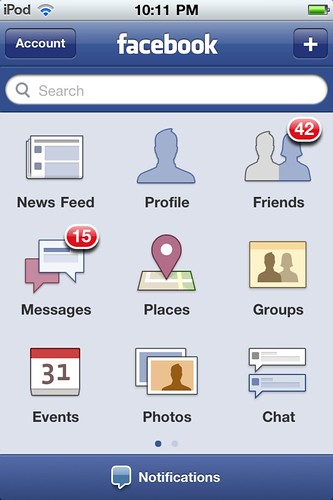
How about this for a home screen?
  • This roughly matches my idea for a home screen.
  • It might be better to split search from capture in the way notification and search are split here.
  • Use of colour and icons is good, even if the colours themselves are a bit insipid.
  • The numbers against the icons could represent documents stored against a tag for me.

Tabbed Screen

Listings
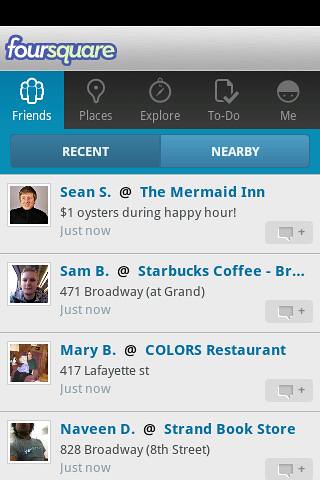
I hadn't thought of this, but it's a good way of expanding the desktop beyond the screen.
  • Could be good for listing tags and the documents belonging to them
  • Limited number of tags across the top but could swipe
  • Scroll down documents
  • We already had concepts of place and time in the original design

Search Results

Filtered search

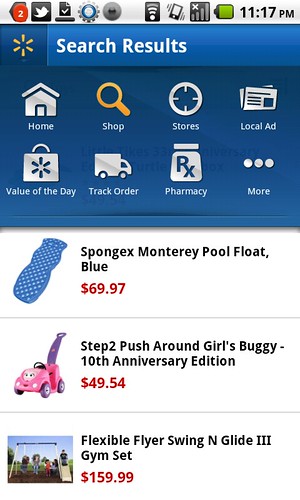
I thought this might do for the search results :
  • Icons would be tags allowing you to filter the search
  • Would anyone use it?
  • Techies love search driven sites.
  • Users only use Google.
  • Is it better than the foursquare screen, which could be adapted to the same job
  • Is the overlay too big, although what's underneath isn't what the user wants to see?

 Answers on a postcard please

  • Do users use the search in a mobile app? They don't use site specific search on the web.
  • Is swiping and scrolling going to make users of the tabbed screen seasick?

Thursday, 7 March 2013

It's just an effing phone -get over it!

I was supposed to write a blog post about mobile design sites -but when I looked at them my heart just died, these mobile designers have less interesting lives than trainspotters -a black turtleneck is the new blue anorak.

It wasn't cool when I bought it
As you can see from my phone, I may not be the best person to write about mobile design, it's old, it's bust, I spent 0s arranging my desktop and the only reason the background isn't the default is that my daughter changed it. In fact the only up to date thing about it is that Evernote got hacked last week.

What do I use my phone for ( compulsory list coming up ) :
  1. Making phone calls -your phone really should do this -please take note Apple.
  2. Sending texts, the soft keyboard is actually good at this, predictive text is brain dead in this version, the one on the playbook is much better.
  3. Browsing the web -of course not, it's slow and far too small, that's what tablets are for.
  4. Email ditto desperation only.
  5. Reading a book ditto.
  6. Listening to music -could do, but don't.
  7. Checking train times -something useful, at last! You can find out when your train should have been here.
  8. Stalking (sorry social media), not since the restraining order.
  9. Navigation -was good but the GPS has never been the same since I went up Snowden with the phone in an open pocket. It was Wales, it was raining, no need for point 10.
  10. Checking the weather -well I am British (and fiercely proud of it!)
  11. Angry Birds -was amusing for 30s. now please fire the lot into an erupting volcano. I am over 12.
So I went looking at these mobile design sites :

Tech mobile blogs:
Design Inspiration:
They are Dull with a capital Duh, just lots of screen shots of mobiles with apps open in them, compare that to what the trainspotter sees :

I think that's my brother!

So my media-bespectacled brethren, throw off your turtlenecks, embrace the nutty slack and get yourselves down to the nearest sidings before it's too late. You've probably got longer than you think, see point 7 above.


Should this post have raised any issues, or upset you in any way please feel free to comment below, there are charities which can help.

Friday, 1 March 2013

Balsamiq Mockups

Following on from last week's paper exercise we now get to create some working wire frames using Balsamiq. Balsamiq is a pretty good tool for doing this and can now export pdfs with links between mockups -which gives you a prototype you can drive. The only downside is that it's expensive for just playing around with, at $12 / month, although it's cheaper if you download the tool -or use the GoogleDrive plugin.


This is a minimal working version of the app -enough to allow uploading, storage and retrieval. Although I didn't carry out the heuristic exercise -maybe at the next meeting of the Likely Lads- I did find a few obvious holes, such as the lack of a home screen. In addition when designing this I noticed some inconsistencies in the interface that I will need to go back and fix.

Following Sam's feedback on the navigation, the usual Android nav. is 'assumed' -which means I was too lazy to link up the back button and the home button, I also forgot to link up the trash.

On the choice of icons vs. a one liner list, I decided that I could get more icons on the small phone home screen. In the actual app the home screen would preferentially display a category of items that the user picks, and perhaps the actual icon could change based on a primary tag?

In the real world I'd probably do both and A/B test, or have it configurable.


linkedin